




Verdict: A specialist's journal that excels at self-analysis and data safety; ideal for committed MetaTrader traders, harder to justify if your broker needs manual CSV imports or you want to try before you buy. We score it 7.1 / 10.
| Attribute | Value | Source |
|---|---|---|
| Company & track record | Trading-journal SaaS operated by Quantum Trade Solutions GmbH, Berliner Strasse 300b, 63065 Offenbach am Main, Germany (HRB 48296, VAT DE299024904). Registered as Quantum Trade Solutions UG on 19 March 2015, converted to GmbH by July 2018. Managing director Rolf H. Schlotmann, co-founder Moritz Czubatinski; the same pair run the trading-education brand Tradeciety. EdgeWonk 2.x was a Java desktop app on a one-time licence; EdgeWonk 3, a cloud rebuild, launched 6 February 2024. | EdgeWonk imprint ↗ |
| Software status | Journaling software, not a regulated financial firm. It holds no financial licence, holds no funds, and executes no orders, which is normal and expected for a journal. The EDGEWONK trademark is registered with the USPTO. No data breach, lawsuit, BBB complaint, or regulator action naming EdgeWonk was found. | EdgeWonk ↗ |
| Pricing & plans | One plan only, annual billing, no monthly option: $197/year USD (shown as roughly $16.50/mo equivalent), with VAT added at checkout for EU/UK buyers (VAT-inclusive totals roughly $230.49 to $250.19). Includes unlimited journals, unlimited trades, and unlimited importing, with no device or connection cap. A “Buy Now & Get 2 Months Free” promo banner runs on the page. A $297 / 24-month option circulates on third-party coupon sites but is not on EdgeWonk's official pricing page. | EdgeWonk ↗ |
| Free tier & trial | No free tier and no free trial. The only no-cost safety net is a 14-day money-back guarantee: “If you're not fully satisfied, we'll refund 100% of your purchase within 14 days. No questions asked.” A higher commitment barrier than freemium rivals. | EdgeWonk ↗ |
| Integrations & data import | The homepage advertises “200+ brokers,” but the only genuine live auto-sync is MetaTrader 4 and MetaTrader 5. That sync uses EdgeWonk-generated FTP credentials entered into MetaTrader (Tools > Options > FTP); MetaTrader then auto-publishes trade reports one-directionally to EdgeWonk when the platform opens. Every other named platform (IC Markets, Pepperstone, Interactive Brokers, cTrader, NinjaTrader, Tradovate, Oanda, FTMO, Exness) is manual CSV or statement-file import. A generic Excel/CSV importer covers unlisted platforms. TradingView is listed “paper trading only.” | EdgeWonk ↗ |
| Supported assets | Forex, Stocks, Futures, Crypto, Commodities, Indices, Options, and CFDs. | EdgeWonk ↗ |
| Analytics & features | Tiltmeter (per-trade discipline score correlated with P&L and win rate), Performance Simulator (Monte Carlo over ~500 trades), Chart Lab (50+ reports incl Sharpe, Sortino, SQN, time-of-day), Edge Finder (automated journal scan, added Nov 2025, marketed “AI-Driven”), Trade Management Optimizer (actual vs best-possible exit), Alternative Strategies (test management approaches against real history), MAE/MFE, R-Multiple, custom checklists and statistics, Psychology Lab, screenshot attachment, read-only revocable journal sharing, weekly/monthly reports, Traffic Lights, Profit Calendar, Command Palette (Mar 2026), Advanced Filters (May 2026). No native mobile app (web only). | EdgeWonk ↗ |
| Data privacy & security | EdgeWonk never asks for a broker login or password; data enters via CSV/Excel upload, manual entry, or the MetaTrader FTP auto-sync (EdgeWonk-generated FTP creds, referencing only the trading account number). Privacy policy last updated February 2024; named processors include HubSpot, PayPal, Stripe, Chargebee, Google Analytics, Facebook Pixel, Zendesk, MailChimp, Refersion, and CloudFlare; GDPR rights under Art 15-20. There is no explicit “we do not sell your data” clause and no SOC 2 or ISO 27001 certification. A Feb-2024 launch blog (not the policy) claims a penetration test by an unnamed German firm and German server location. | EdgeWonk ↗ |
“Your personal data is not disclosed to third parties for purposes other than those listed in this Privacy Policy.”
EdgeWonk Terms of Service, Privacy Policy, Art 5 (last updated February 2024), accessed June 2026 TOS ↗
Annual billing only; no monthly option; no free trial, 14-day money-back guarantee“Praise centres on the depth of analytics, the Tiltmeter psychology and discipline tracking, responsive support, and strong value for money.”
Community sentiment, Trustpilot aggregate (individual reviews unverifiable), 2026 source ↗
“Complaints centre on manual CSV import friction for non-MetaTrader brokers, the lack of a native mobile app, the learning curve from feature density, and the move from a one-time licence to an annual subscription.”
Community sentiment, Trustpilot aggregate (individual reviews unverifiable), 2026 source ↗
- Best-in-class psychology and discipline analytics (Tiltmeter correlated to P&L and win rate)
- Powerful simulation tooling: Performance Simulator, Trade Management Optimizer, Alternative Strategies
- Chart Lab with 50-plus reports including Sharpe, Sortino, and SQN
- Never receives your broker login or password; the cleanest credential model on our list
- Genuine one-directional live auto-sync for MetaTrader 4 and 5
- Unlimited journals, trades, and imports on the single plan, with no device cap
- German hosting, clear GDPR rights, and a no-questions-asked 14-day refund
- Live auto-sync is MetaTrader-only; the advertised “200+ brokers” are overwhelmingly manual CSV import
- No native iOS or Android app; web-only, usable in a mobile browser
- No free tier and no free trial, only a 14-day money-back guarantee
- Annual-only billing with auto-renewal (mitigated by a reminder email), a higher commitment barrier than freemium rivals
- No explicit “we do not sell your data” clause and no SOC 2 / ISO 27001 certification
Verdict: A powerful, feature-rich journal worth trialing if you will use its depth, but stress-test your broker sync during the 7-day trial before committing, because refunds are off the table. We score it 7.0 / 10.
| Attribute | Value | Source |
|---|---|---|
| Company & track record | Trading-journal and analytics software operated by 1473010 Alberta Ltd., trading as tradersync.com, a small unfunded company in Calgary, Alberta, Canada, with David Olivares listed as co-founder. The homepage says “Since 2013” while third parties cite 2014 or 2015, so the honest framing is that it has been running for about a decade. The TRADERSYNC trademark is confirmed under the same Alberta entity. | USPTO / Crunchbase ↗ |
| Software status | Journaling software, not a regulated financial firm. A trading journal neither holds nor needs a FINRA, FCA or ASIC licence, so the absence of one is normal and not a negative. No data breach, scam, lawsuit, or regulator action naming TraderSync was found. | TheFXGeek assessment ↗ |
| Pricing & plans | Three paid tiers, monthly or annual (annual saves 25%). Monthly: Pro $29.95, Premium $49.95, Elite $79.95. Annual: Pro $22.46/mo ($269.52/yr), Premium $37.46/mo ($449.52/yr), Elite $59.96/mo ($719.52/yr). Pro caps you at 5 accounts, 3 Strategy Checker strategies, 1 trade plan and 3 playlists; Premium and Elite lift those to unlimited. Cypher AI message caps scale 5/15/60 per day; Cypher Coach, 250ms replay, Level II, options replay and automated backtesting are Elite-only. | TraderSync ↗ |
| Free tier & trial | No permanent free tier (the old free Basic/Twitter plan is discontinued). A 7-day free trial requires no credit card and grants top-tier features. Given the strict no-refund policy, this trial is the only real safety net before paying. | TraderSync ↗ |
| Integrations & data import | Markets “700+ brokers and platforms” with three methods: auto-sync, file/CSV import, and manual entry. Read-only auto-sync is documented for Interactive Brokers (Flex Query report token, which does not use your IB login once set) and crypto exchanges (read-only API key); DAS Trader uses an email-matched market-data drop-copy. For most stock brokers (TD Ameritrade/Schwab, TradeStation, Webull, Tastytrade, NinjaTrader, Fidelity, E*TRADE, Robinhood, cTrader, Sierra Chart, IG) the sync method is undocumented at a primary level and several are reported as CSV-based. | TraderSync ↗ |
| Supported assets | All paid plans support stocks, equity options including auto-detected multi-leg spreads, futures, futures options, forex, crypto, CFDs and indices. Genuinely multi-asset rather than built for one market. | TraderSync ↗ |
| Analytics & features | 40-plus metrics including win rate, profit factor, expectancy, MAE/MFE, exit efficiency, optimal-exit analysis, running P&L, risk-exposure report, P&L calendar, and breakdowns by time of day, day of week, setup and mistake, plus side-by-side comparison and advanced filtering. Journaling adds tags, notes, screenshots, chart annotation and public trade sharing (no dedicated mentor mode). A Strategy Checker tracks rule compliance, a market-replay simulator replays real historical sessions, and Cypher AI surfaces pattern insights, with proactive Cypher Coach and automated backtesting on Elite. No backtesting on mobile. | TraderSync ↗ |
| Data privacy & security | Privacy policy last modified April 2022 (over four years old). Discloses collection of name, email, username, password, payment data (cards processed by Stripe, not stored), contact, device and analytics data, and sharing with Stripe, Google Analytics, affiliate tracking and on a business transfer. It is silent on trade-data monetisation, hosting location, retention and deletion/erasure rights, and no SOC 2 or ISO 27001 is claimed. Data is stored encrypted on Amazon cloud, and the site uses TLS. Credential type is documented as read-only only for IBKR and crypto; for most brokers it is undisclosed. | TraderSync ↗ |
| Mobile apps | iOS app v2.10.15 rated 2.7/5 (84 ratings) and Android v1.8.7 rated 2.9/5 (223 reviews, 50K+ downloads). The apps handle logging, notes, screenshots, the P&L calendar, analytics and imports, but no backtesting. The mobile experience is rated well below the web product. | App Store / Google Play ↗ |
| Platform | Score | Sample | Source |
|---|---|---|---|
| Trustpilot | 4.3 / 5 | 309 reviews | Source ↗ |
| App Store (iOS) | 2.7 / 5 | 84 ratings | Source ↗ |
| Google Play | 2.9 / 5 | 223 reviews | Source ↗ |
| StockBrokers.com (editorial) | 4.0 / 5 | Editor review | Source ↗ |
| Aggregate | 4.3 / 5 | 309 Trustpilot reviews (recent ones skew negative on sync reliability) | Normalized by TheFXGeek |
“Paid Subscription fees are non-refundable.”
TraderSync Terms of Service, Terms and Conditions (updated 11 July 2024); the support pages add “No, all sales are final” and “no pro-rated refunds”, accessed June 2026 TOS ↗
Billed monthly or annually (25% off); 7-day free trial, no card required“I tried many trading journals already, but recently switched to Tradersync. It is just the most versatile and easy to use one, very beautifully designed.”
Edmund Schäffer, Trustpilot, June 2025 source ↗
“A trading journal's only job is data integrity, and this platform suffers from severe structural bugs that actively corrupt your dashboard, compounded by a customer service department that completely ignores its users.”
Zezen Nguyen, Trustpilot (1 star), May 2026 source ↗
- 40-plus analytics metrics including MAE/MFE, expectancy, exit efficiency and optimal-exit analysis
- Market-replay simulator with playlists, speed control and tick precision, rare in a journal
- Strategy Checker tracks rule compliance per trade (max daily loss, position sizing, timing)
- Broad multi-asset support: stocks, options with auto-detected multi-leg spreads, futures, forex, crypto, CFDs, indices
- Documented read-only auto-sync for Interactive Brokers (Flex Query token) and crypto exchanges (read-only API key)
- Cypher AI assistant on all plans, with proactive Cypher Coach on Elite
- 7-day free trial with no credit card required, granting top-tier features
- Trustpilot 4.3 / 5 with consistent praise for clean design and responsive live chat
- Recent reviews report structural data bugs, “Zombie Trades” and wrong currency-base conversions that corrupt P&L, with fixes reportedly taking months
- “700+ brokers” is broad but sync method is undocumented for most; only IBKR and crypto are confirmed read-only auto-sync, several others are CSV-based
- No permanent free tier and premium pricing (Elite near $720/yr)
- Strict no-refund policy: all sales final, non-refundable, auto-renewing subscriptions
- Privacy policy over four years old and silent on trade-data monetisation, hosting, retention and deletion rights; weak mobile apps (iOS 2.7, Android 2.9)
Verdict: Tradervue is a capable, honest, analytics-strong veteran trading journal held back by dated UX, missing modern features, and billing friction. Worth it for analytics-first traders with a clean import path; skip it if you need one-click sync, a mobile app, or AI. We score it 6.7 / 10.
| Attribute | Value | Source |
|---|---|---|
| Company & track record | Trading-journal and analytics software operated by Tradervue SSC LLC, wholly owned by SureSwift Capital, Inc., a Canadian SaaS acquirer in Victoria, British Columbia. Founded by Greg Reinacker (ex-NewsGator CTO) in 2011, grew past 100,000 users, and was acquired by SureSwift in a deal announced March 2021. Roughly 15 years old in 2026, one of the longest-running dedicated journals. Homepage claims 207,623 traders. | SureSwift Capital ↗ |
| Software status | Journaling software, not a regulated financial firm. The terms state plainly that Tradervue is not a registered broker-dealer nor a registered investment advisor, which is normal and expected for a journal. No data breach, scam, lawsuit, or regulator action naming Tradervue was found. | Tradervue ↗ |
| Pricing & plans | Silver $29.95/mo and Gold $49.95/mo, monthly only on Tradervue's own pricing page. Annual figures of $323.46 (Silver) and $479.52 (Gold), framed as a 10% and 20% discount, are reported by StockBrokers.com but are not shown on Tradervue's site. Silver and Gold both include unlimited imports and unlimited trading accounts; image storage is 1 GB on Silver and 5 GB on Gold. | Tradervue ↗ |
| Free tier & trial | Free plan requires no card and allows 30 grouped trades per calendar month (the FAQ contradicts this with a stale 100-trade figure); it does not support futures. The 7-day trial requires a credit card and auto-charges at the end unless you switch to the free plan first. | Tradervue ↗ |
| Integrations & data import | Homepage claims 80+ platform integrations. Two methods: Standard Import (manual CSV/Excel upload, no broker credentials transmitted) and Broker Sync (direct API, daily or real-time). Broker sync may not be available with all brokers, and per-broker sync status is largely undocumented. In practice many popular paths are manual CSV (NinjaTrader, Robinhood, Webull, Interactive Brokers via Flex Query). DAS Trader Pro is the one clearly documented credentials-safe auto-import. | Tradervue ↗ |
| Supported assets | US equities and ETFs, options on US equities, futures (Silver/Gold required), futures options, and all active forex currency pairs. Some crypto futures (XBT/BTC contracts) appear in the futures list. Crypto spot is not supported and CFDs are not listed. | Tradervue ↗ |
| Analytics & features | 100+ analytics reports across six categories plus MFE/MAE excursion stats. Gold adds exit-performance and max-potential-P&L analysis, commissions and fees tracking, risk and liquidity reports, and extra chart types. Interactive TradingView charts shipped to all tiers in June 2026. Notes, tags, calendar view, community sharing, and mentoring are included. No backtesting, no trade replay, no AI features, and no native mobile app (web only). | Tradervue ↗ |
| Data privacy & security | Privacy policy states Tradervue does not sell personal information, does not store credit card details (Stripe handles payments), and does not share financial data with third parties. Hosted on Amazon Cloud Services in the USA; data retained until deletion is requested. No SOC 2, ISO 27001, security page, or encryption-at-rest documentation, and the credential model for general broker sync is not disclosed. | Tradervue ↗ |
“We do not store credit card details on this site nor do we share customer details relating to financial data with any 3rd parties.”
Tradervue Terms of Service, Privacy Policy (last updated 23 Feb 2024), accessed June 2026 TOS ↗
Monthly billing on-site; the 7-day trial requires a card and auto-charges; annual prices are reported only by third parties“I just purchased the Gold program 4 days ago, trusting the endorsement from SMB Capital. Once I learned the import process, I uploaded 499 trades (2024 and 2025) in less than 10 minutes.”
Gold subscriber, Trustpilot (handle/date unverified), 2026 source ↗
“Do not do any type of subcription, or even login! I did login, just to cheek it, and never used it after that. Two months later, alteady 100€ out of my account! And i did not subscribe to any payment, i never do!”
Trustpilot reviewer, Trustpilot (handle/date unverified), 2026 source ↗
- Deep, mature analytics: 100+ reports across six categories plus MFE/MAE excursion stats
- Genuinely useful free tier (30 grouped trades per month, no credit card required)
- 15-year track record under active maintenance (MRR growth, TradingView charts added June 2026)
- Relatively strong privacy posture: does not sell data, store cards, or share financial data
- Broad asset coverage: US equities, options, futures, futures options, and all active forex pairs
- Unlimited imports and unlimited trading accounts on both paid tiers
- One confirmed credentials-safe auto-import (DAS Trader Pro, which never asks for your password)
- Auto-sync breadth overstated: most popular brokers import via manual CSV, not live sync
- No AI insights, no trade replay, and no native mobile app; the interface feels dated
- Broker-sync credential model undisclosed (read-only vs full login) except for DAS Trader Pro
- Auto-renew default plus a card-required trial plus no refund clause creates real billing friction
- Poor 2.6 / 5 Trustpilot record (small sample) dominated by cancellation and billing complaints
Verdict: Trademetria is a strong value journal for file-importing and MT4/MT5 traders, held back by Pro-gated auto-sync, a hostile refund policy, and thin company transparency. Read the integration list before assuming your broker auto-syncs. We score it 6.5 / 10.
| Attribute | Value | Source |
|---|---|---|
| Company & track record | Trading-journal SaaS founded by Thiago Ghilardi. The company says it launched in 2016 and serves 80,000+ users with 15M+ trades logged (self-reported, not independently verified). The Terms of Service describe a "Wyoming based company" at 1309 Coffeen Avenue Ste 1200, Sheridan, WY 82801, but that is a known mass registered-agent / virtual-office address and the entity could not be confirmed on the Wyoming Secretary of State register, so we treat the location as stated but unverified. By all signals a small, bootstrapped operation (roughly 1-10 people). No data breach, lawsuit, or regulator action naming Trademetria was found. | Trademetria Terms of Service ↗ |
| Software status | Journaling software, not a regulated financial firm. It holds no financial licence, holds no funds, and executes no orders, which is normal and expected for a journal. There are no deposits at risk. | Trademetria ↗ |
| Pricing & plans | Three tiers. Free $0/mo (30 order imports/mo, 1 account, 3 open positions, no auto-sync). Basic $19.95/mo monthly or $14.10/mo billed annually ($169/yr, "saves 30%"): 500 imports/mo, 1 account, 200 open positions, CSV import only. Pro $29.95/mo monthly or $20.80/mo billed annually ($249/yr): unlimited imports, 50 accounts, unlimited open positions, and the only plan with broker auto-sync. Payment via PayPal and Stripe. | Trademetria ↗ |
| Free tier & trial | Genuinely useful free plan at $0/mo with the full analytics and journaling engine, capped at 30 order imports a month, 1 account, and 3 open positions (no auto-sync). The free trial is framed as full access "for up to 200 page views" with no credit card required. | Trademetria ↗ |
| Integrations & data import | Marketing cites "300+", "1500+", and "140+" integrations, but those are total import-compatibility figures, overwhelmingly CSV / file upload. True live auto-sync covers only 21 platforms: Alpaca, Bitget, Bitmex, Charles Schwab, Etrade (via Alerts), Fidelity, Interactive Brokers, Kraken, Kucoin, MT4, MT5, Moomoo, Power Etrade, Questrade, Robinhood, Stake, Tastytrade, Tradestation, Tradier, Tradovate, Webull. Everything else (Binance, Coinbase, Oanda, Forex.com, eToro, FXCM, IG, Plus500, NinjaTrader, ThinkorSwim, TradingView, FTMO, FundedNext, and many others) is manual CSV / file import. Auto-sync of any kind requires the Pro plan. No integrations are marked coming-soon. | Trademetria ↗ |
| Supported assets | Equities, options, futures, forex, CFDs, and crypto (with some limits on illiquid options and leveraged crypto). All asset classes available on every plan including Free. | Trademetria ↗ |
| Analytics & features | 20+ metrics (profit factor, expectancy, R-multiples, win rate, daily win rate, long/short ratios, holding times), strategy and instrument rankings, distribution by time and market condition, trading calendar, automatic chart entry/exit markers, searchable WYSIWYG note editor, unlimited searchable image journal, tagging by strategy/mistake/account, portfolio tracker with S&P/Nasdaq benchmarking + equity curve + multi-account consolidated open P&L, P&L/trading simulator, trade sharing with mentors, trade challenges, mass edit, options spread leg-level tracking + spread reports, transaction tracking (deposits/withdrawals/fees/dividends), REST API, and advertised AI Insights + AI Assistant (tier availability unconfirmed). No native mobile app; PWA only. Languages: EN-US, EN-UK, PT-BR, DE, FR, IT, ES. | Trademetria ↗ |
| Data privacy & security | Privacy policy (dated March 2, 2020) states "We don't sell your data or anonymous data to third parties." Cites TLS 1.2+, encrypted/undecryptable passwords, daily online and offline backups, semi-annual audits by unnamed certified experts, Cloudflare, and an A+ SSL Labs grade; card data is handled only by Stripe and PayPal. Named third parties: Google Analytics, Stripe, PayPal, Cloudflare. Data is hosted and processed in the US. On account close, all data is deleted except email, hashed password, signup date, plan, and order data. MT4/MT5 sync never receives a broker login (Trademetria's own FTP credentials, HTML push, no EA); for other API brokers the authentication method is not publicly documented. No SOC 2 / ISO 27001 attestation, and the policy is over six years old. | Trademetria ↗ |
“refunds will only be issued in cases where coding errors, which cannot be resolved by our team after notification, continue to persist. Pro-rated refunds will be given only to users who wish to upgrade from their basic plan subscription to a pro plan subscription.”
Trademetria Terms of Service, Terms of Service, Section 3 (Refund Policy), accessed June 2026 TOS ↗
Free plan available; paid plans billed monthly or annually (30% annual discount); free trial up to 200 page views, no card“Very satisfied. been using for 4 years. Support is really fast and new features are released constantly.”
SourceForge reviewer (anonymous, 4-year user), SourceForge, Oct 2024 source ↗
“Importing complex option trades can be a nightmare if you have a lot of trades, it doesn't seem like it's ever calculating my imports 100% correctly.”
Alex M., Derivatives Trader, Capterra, Oct 2020 source ↗
- Genuinely useful free tier with the full analytics and journaling engine
- Low Basic price ($14.10/mo billed annually) for active importers
- 20+ performance metrics plus strategy and instrument rankings and benchmarking
- Flexible tagging and an unlimited searchable image journal
- Credential-safe MT4/MT5 sync via Trademetria's own FTP, no broker login shared, no EA
- Multi-account consolidated P&L with S&P and Nasdaq benchmarking
- Verified, fast, highly praised customer support (Capterra 4.7/5)
- Clear no-data-selling commitment stated in the privacy policy
- Auto-sync is Pro-only and limited to 21 platforms; the big integration numbers are mostly CSV import
- Authentication method undocumented for non-MetaTrader API brokers (Tradovate, Robinhood, Tradier, IB API)
- Hostile refund policy: refunds only for unresolved coding errors, pro-rated only on Basic-to-Pro upgrade
- Privacy policy dated March 2020 with no SOC 2 or ISO 27001 attestation; company legitimacy thinly documented
- No native mobile app (PWA only); recurring complaints about complex options-import accuracy
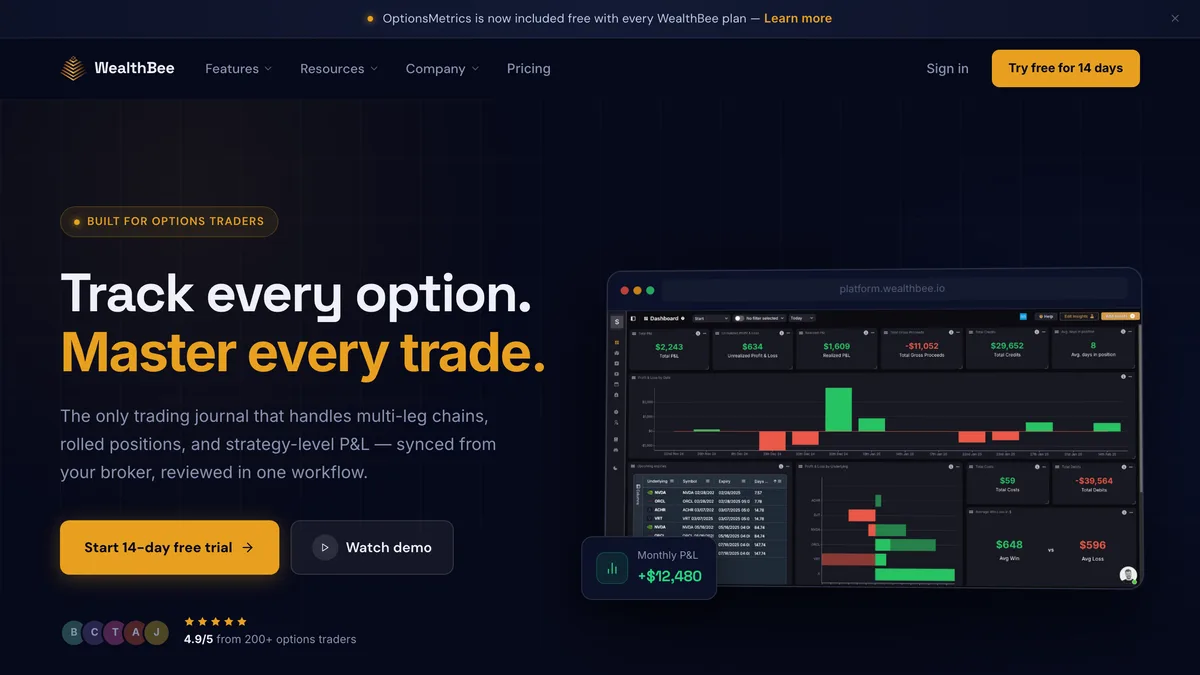
Verdict: A sharp, fairly priced options journal worth a trial for traders on a supported broker, but not a fit for FX, crypto, or CFD traders, and the thin reviews plus company-identity gaps warrant caution. We score it 6.4 / 10.
| Attribute | Value | Source |
|---|---|---|
| Company & track record | Trading-journal SaaS operated by a UK micro-entity. Companies House lists the live legal entity as VERAXA AI LTD (company #15754842), renamed from WEALTHBEE LTD on 1 June 2026 with no public explanation. Incorporated 1 June 2024, registered office Dutch Barn, Burnthurst Lane, Princethorpe, Warwickshire CV23 9QA, SIC 62012 (software development), status Active, filing micro-entity accounts. Directors Philip John Cartwright (b. Nov 1971) and Matthew Philip Lockyer (b. May 1992), both appointed 1 June 2024. The About page claims the company was founded in 2021 and “designed and developed in London,” which conflicts with the register. | Companies House #15754842 ↗ |
| Software status | Journaling software, not a regulated financial firm. It holds no financial licence, holds no funds, and executes no orders, which is normal and expected for a journal. The terms state: “WealthBee does not and will never provide advice. Always make your own decisions.” No data breach, lawsuit, or regulator action naming WealthBee was found; Scamadviser flags a low trust score (hidden WHOIS, young domain, low traffic), but the UK entity is real and active. | WealthBee ↗ |
| Pricing & plans | One consumer plan. Monthly is $19.99/mo (confirmed on the affiliates page, oddly not shown on the homepage pricing toggle). Annual is $149.99/year, displayed as roughly $12.50/mo with a “Save 20%” badge, saving about $89.89/year. Both advertise unlimited portfolios and unlimited trade imports. Enterprise pricing is custom and adds an embeddable dashboard and AI-powered automated reporting. | WealthBee ↗ |
| Free tier & trial | No free product tier; the free Google Sheets template on the site is a separate giveaway, not the app. There is a 14-day free trial, but it requires a credit card up front, so the onus is on the user to cancel before billing if it is not a fit. | WealthBee ↗ |
| Integrations & data import | Documented live read-only auto-sync exists for five brokers: Interactive Brokers (Flex Web Service token + Query IDs, with CSV Flex Query import also available), Charles Schwab (API, two-step auth), Questrade (OAuth-style authorize), Tradier, and TradeStation. The homepage applies an “AutoSync” label to six more (TastyTrade, Robinhood, E*TRADE, Fidelity, Webull, Wealthsimple) with no integration docs, so we treat those as unconfirmed marketing labels, not verified live sync. “AI Import for any broker” is undocumented. The features page lists Thinkorswim, Firstrade, Ally, and TD Ameritrade as file-import sources. Synced data is delayed roughly 15-20 minutes and refreshes every few minutes up to every 20 minutes per asset class. | WealthBee ↗ |
| Supported assets | Equities/ETFs, options, futures, and user-defined “unlisted assets.” There is no forex, crypto, or CFD support, which rules it out for much of TheFXGeek's audience. | WealthBee ↗ |
| Analytics & features | Customizable dashboard with 40-plus widgets and multi-portfolio support; P&L analytics by strategy, underlying, and weekday, cumulative and realized P&L, win rate, average gain/loss, and average holding time; multi-leg options chain and roll tracking; option payoff diagrams and risk analysis with breakeven; historic price charts; positions and transactions tracking; cashflow tracking (dividends, interest, deposits/withdrawals, fees, tax); calendar plus earnings calendar; trade notes, tagging, and book categorization; automated strategy categorization; custom reports; a margin calculator; and the OptionsMetrics scanner (Greeks, volume/OI) bundled free. No backtesting, trade replay, screenshot/image attachments, custom fields, or named playbooks were found. Web only, with no native mobile app. | WealthBee ↗ |
| Data privacy & security | The IBKR page states verbatim: “We only request read-only access to sync portfolio data” and “Credentials are never stored on our servers; the connection is broker-authorized.” That guarantee is verified for IBKR; Schwab, Questrade, Tradier, and TradeStation use softer “we never see your password” authorize flows. The privacy policy (last edited 31 May 2024) is thin: it collects email, region, IP, browser, access times, pages, and payment info; shares with “trusted partners”; states it does not sell, rent, or lease customer lists; and limits security to “SSL Protocol [and] Data Encryption.” No SOC 2, ISO 27001, GDPR-specific language, named sub-processors, hosting region, retention period, or deletion-rights clause is disclosed. | WealthBee ↗ |
“You may cancel your subscription at any time. To qualify for a refund of the active month's subscription, you must request a refund within 14 days of becoming a customer. You may only have one account.”
WealthBee Terms of Service, Terms & Conditions, Cancellation/Refund, accessed June 2026 TOS ↗
Billed annually at $149.99/yr; $19.99/mo monthly; 14-day card-required trial“Options traders praise the position-level modelling, contrasting it favourably with execution-centric rivals like Tradervue, TraderSync, and TradesViz; one wrote of finding “a real and complete follow up of the options trades” and liking the IBKR sync.”
Community sentiment, Trustpilot (reviewer/date not independently verified; page 403-blocked), 2026 source ↗
“The software has a lot of bugs. It is not there and really needs a lot of work. Support is lagging. Also the syncing is messed up. simple app”
Nab A., SourceForge (1.0/5, verified review), 27 Jun 2025 source ↗
- Best-in-class options modelling: multi-leg chains, roll tracking, payoff diagrams, breakeven and risk analysis
- OptionsMetrics Greeks scanner bundled free with every subscription
- Documented read-only auto-sync with five brokers (IBKR, Schwab, Questrade, Tradier, TradeStation)
- IBKR connection is explicitly read-only with credentials never stored on WealthBee servers
- Customisable analytics dashboard with 40-plus widgets and multi-portfolio support
- Competitive annual price (~$12.50/mo) with unlimited portfolios and imports
- Privacy policy states it does not sell, rent, or lease customer lists
- No forex, crypto, or CFD support, ruling it out for much of an FX-focused audience
- Six homepage “AutoSync” brokers and “AI Import for any broker” are undocumented, not verified live auto-sync
- Recurring sync-reliability and bug complaints in a very thin, polarised review base
- No native mobile app (web only); App Store “WealthBee” apps belong to a different company
- Company-identity red flags: 2024 incorporation vs a “2021” claim, Warwickshire vs “London,” and an unexplained rename to VERAXA AI LTD
What to look for in a trading journal
Integrations: Automatic Sync Beats Manual Entry
The single biggest predictor of whether you will still use a journal in three months is how your trades get into it. Automatic sync from your broker or platform keeps your history current with zero effort; CSV import works but adds friction; manual entry is where most journals quietly die. Before you commit, confirm the tool genuinely supports your specific broker or platform today, not on a coming-soon roadmap, and check whether the connection is fully automatic or just a file upload.
Analytics That Actually Change How You Trade
Logging trades is the easy part; the value is in what the tool shows you afterwards. Look for breakdowns by setup, session, instrument, and day of week, plus core metrics like expectancy, profit factor, and average win versus average loss. The best journals make it obvious which one or two patterns drive most of your profit or loss. A single clear chart that changes a habit is worth more than a dashboard full of vanity stats you never act on.
Pricing, Free Tiers, and Lock-In
Trading journals usually charge a monthly or annual subscription, often with a limited free tier or trial. Check what the free plan actually includes, since some cap you at a few trades or hide the analytics that make the tool worthwhile. Weigh annual pricing against monthly, confirm the refund and auto-renewal terms, and check how easily you can export your data if you decide to leave, so you are not locked in by your own trade history.
Your Data and Broker Credentials
A trading journal sees your entire trading history and sometimes connects directly to your brokerage account, so how it handles that access matters. Favour tools that use a read-only connection or a simple file import over ones that ask for full account credentials or trading permissions. Read the privacy policy to see whether your data is sold or shared, and confirm you can delete your account and data on request.
Forex Trading Glossary
Quick definitions for terms used throughout this guide, spreads, pips, leverage, and margin, and how they shape what trading with a given broker actually costs.
- Auto-sync
- An integration that pulls your trades from a broker or platform into the journal automatically, with no manual entry or file upload.
- CSV import
- Adding trades by uploading a comma-separated trade-history file exported from your broker or platform, rather than syncing automatically.
- Win rate
- The percentage of your trades that close in profit. On its own it means little without the average size of wins versus losses.
- Expectancy
- The average amount you can expect to win or lose per trade over time, combining win rate with average win and average loss.
- R-multiple
- A trade's result expressed as a multiple of the risk taken on it. Risking 1R to make 2R is a 2R winner, which lets you compare trades of different sizes.
- Profit factor
- Gross profit divided by gross loss. A profit factor above 1 means the strategy made more than it lost over the period measured.
- Equity curve
- A running chart of your account balance over time, used to see consistency, drawdowns, and whether performance is trending up or down.
- MAE / MFE
- Maximum Adverse and Maximum Favorable Excursion: the worst and best unrealised points a trade reached, used to refine stop-loss and take-profit placement.
- Drawdown
- The peak-to-trough decline in your account balance, a measure of how much you gave back from a high before recovering.
- Setup tag
- A label you attach to each trade to group it by strategy, so the journal can show which approaches actually make money.
- Read-only API key
- A broker connection that lets a tool view your trades and balances but not place or modify orders, the safer way to link a journal to a live account.
- Trade replay
- Stepping back through a past session bar by bar, or testing a strategy against historical data, to study execution and build a track record.
How we rank
Every trading journal is scored from 1 to 10 across six weighted axes: analytics and insights, integrations and data import, journaling and workflow, cost and value, data privacy and security, and support and reputation. We check which broker and platform integrations are genuinely automatic versus CSV-import only, confirm the pricing tiers and any free plan or trial against the provider's own pages, and read the privacy policy to see exactly how each tool handles your trade history and broker credentials. Scores are reviewed as pricing, features, and integrations change, and affiliate relationships never influence a ranking or a position in this list.
Frequently asked questions
EdgeWonk offers arguably the best behavioural analytics and the safest credential model in its class, but true live auto-sync is MetaTrader-only and there is no free tier or trial. Open a demo to try it risk-free, then fund a live account when you're ready. Trading carries risk.
Try EdgeWonk